
Evidence

Performing an Example Copy with Robocopy – eDiscovery Best Practices

Yesterday, we discussed the benefits of Robocopy, how to access it via the command line prompt (if you have Windows Vista or later) and how to get it (if you don’t).  Today, we’re going to perform an example copy and take a look at the results.

As you’ll recall, we discussed the pitfalls last week of using drag and drop for collecting files for eDiscovery and illustrated an example using a blog post that I wrote about a month ago in a Word document for the post Five Common Myths About Predictive Coding.  If you followed the steps along with one of your own files, you noticed that the resulting file appeared to have been modified before it was created, which reflects spoliation of the metadata during the copy process.  Let’s see how Robocopy handles that file copy.

I mentioned yesterday that Robocopy is a command line tool.  If you’re really good at typing long commands at the command prompt without making a mistake, you can enter cmd in the ‘Search programs and files’ box from the Windows Start menu (‘Start’, then ‘Run’, for older versions on Windows) and that will open up a window with the command prompt.  Feel free to “have at it”.

I actually use Excel as a Robocopy script builder – courtesy of CloudNine Discovery’s Vice President of Computer Forensics, Michael Heslop (thanks, Mikey!).  The Excel workbook that I’m using takes user entered information regarding the custodian’s files to be copied and uses that to build a Robocopy statement that can then be executed at the command prompt.  I have three script examples in the Excel file: 1) Script to copy all files/folders in a folder path, 2) Script to copy specific file extensions in a folder path, and 3) Script to copy one file in a folder path.  It’s the third script example I’ll use here.

You’ll see below that I’ve highlighted the changes I’ve made to the single file copy script in the Excel spreadsheet, specifying the file name that I want to copy, the name of the custodian, the destination drive (in this case, the “E:” drive which references a connected external drive) and the path to be copied.
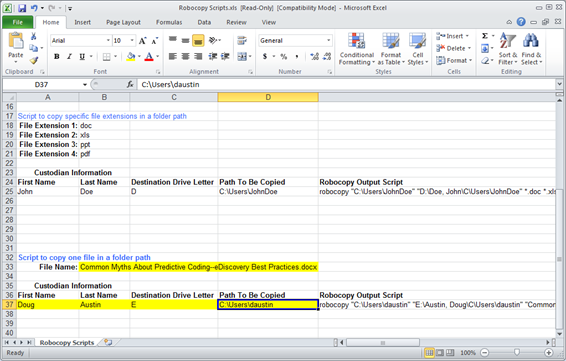
The resulting Robocopy statement created is as follows:

robocopy “C:Usersdaustin” “E:Austin, DougCUsersdaustin” “Common Myths About Predictive Coding–eDiscovery Best Practices.docx” /S /ZB /XJ /V /TEE /W:0 /R:0 /LOG+:”E:RobcopyLog-Austin,Doug.log”

This statement (that Michael created) takes the prompt information I’ve provided and uses it to build the Robocopy statement with desired copy and logging options.  To see a list of available options for Robocopy, type robocopy /? at the command prompt.

I take the Robocopy statement and copy it, pasting it into an empty file in Notepad or Wordpad, then save it with a file name that contains a “.bat” extension (e.g., robocop1.bat, saved to my desktop).  Then, simply double-click the file and it will open up a command window on the desktop and execute the statement.

Doing so put a copy of the file in the E:Austin, DougCUsersdaustinDocuments folder.  It also created a log file at the root which documents every folder it checked and the one folder in which it found the file.  Look at the properties of the copied file and you’ll see:
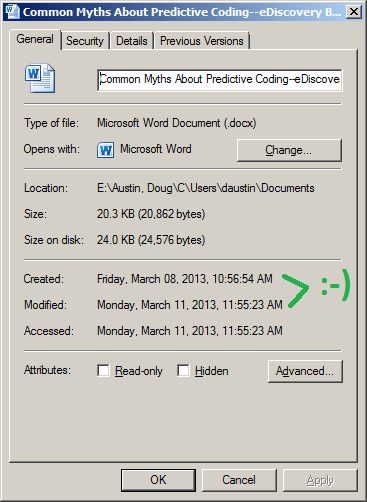
The Created date and the Accessed date reflect the original date and time when the file was created and last accessed.  That’s what we want!

You can request a copy of my Excel Robocopy script builder by sending an email to me at daustin@cloudnincloudnine.comm and I’ll be happy to send it to you.   It’s rudimentary, but it works!

So, what do you think?  Have you used Robocopy as a mechanism for eDiscovery collection?  Please share any comments you might have or if you’d like to know more about a particular topic.

Disclaimer: The views represented herein are exclusively the views of the author, and do not necessarily represent the views held by CloudNine Discovery. eDiscoveryDaily is made available by CloudNine Discovery solely for educational purposes to provide general information about general eDiscovery principles and not to provide specific legal advice applicable to any particular circumstance. eDiscoveryDaily should not be used as a substitute for competent legal advice from a lawyer you have retained and who has agreed to represent you.

Want to Save Your Metadata in Collection? Robocop(y) to the Rescue! – eDiscovery Best Practices

I may be showing my age, but I love the original movie RoboCop (1987).  Good movie for its time (the original, not the sequels).  But, I digress…

Last week, we discussed the pitfalls of using drag and drop for collecting files for eDiscovery and illustrated an example using a blog post that I wrote about a month ago in a Word document for the post Five Common Myths About Predictive Coding.  If you followed the steps along with one of your own files, you noticed that the resulting file appeared to have been modified before it was created, which reflects spoliation of the metadata during the copy process.

I mentioned that there are better, more forensically sound, free methods for collecting data.  One such method is Robocopy.  Robocopy is short for “Robust File Copy”.  So, technically, it has nothing to do with RoboCop, unless you consider that it protects your file metadata during the copy and saves you from spoliation of data.  Here are some key benefits:

  • Saves Metadata: Preserves file system date/time stamps which, as we illustrated last week, drag and drop does not preserve;
  • Targeted Collections: Suitable for targeted active file collections, primarily based on copying folders and their contents (files and sub-folders), not for deleted files or data from unallocated space;
  • Reliable: Enables the user to resume copying where it left off in the event of network/system interruptions;
  • Complete: Supports mirroring of the source folder so that the entire contents can be copied, including empty folders;
  • Self-Documenting: Provides an option to log the copy process for self-documentation, useful for chain of custody tracking.

If you have Windows Vista (or a later version of Windows, such as Windows 7 or Windows 8), you already have the command line version of Robocopy.  Robocopy provides numerous options for copying, including how files are copied, which files are selected, options for retrying files that fail to copy and options to log the copy process.  To see all syntax options for Robocopy (and there are many), type robocopy /? at the command prompt.

If you have an earlier version of Windows (like XP), Robocopy is not automatically included with your version of Windows.  To install it you have two options: 1. Download the robocopy.exe from the Windows 2003 resource kit, or 2. Install a GUI version which includes the exe.

If you prefer a GUI interface for later versions of Windows, you can try Richcopy (which we will discuss next week).

Not excited about using a command line tool?  Tomorrow, we will walk through a Robocopy exercise with the same file I copied last week and I will discuss how you can build a Robocopy “script” in Excel (or use one that I already have) to make the copying and collection process easier.

So, what do you think?  Have you used Robocopy as a mechanism for eDiscovery collection?  Please share any comments you might have or if you’d like to know more about a particular topic.

Image Copyright ©Metro-Goldwyn-Mayer Studios Inc.

Disclaimer: The views represented herein are exclusively the views of the author, and do not necessarily represent the views held by CloudNine Discovery. eDiscoveryDaily is made available by CloudNine Discovery solely for educational purposes to provide general information about general eDiscovery principles and not to provide specific legal advice applicable to any particular circumstance. eDiscoveryDaily should not be used as a substitute for competent legal advice from a lawyer you have retained and who has agreed to represent you.

Pop Quiz: Is it Possible for a File to be Modified Before it is Created? – eDiscovery Best Practices

Sounds like a trick question, doesn’t it?  The answer is yes.  And, collecting files in a forensically unsound manner can be a drag…and drop.

You know those TV shows where they say “Don’t try this at home?”  Here is an exercise you can try at home.  Follow these steps:

Open Windows Explorer and go to one of your commonly used folders – for example, your Documents folder.  Select one of the documents by clicking on it.  Then, hold down the Ctrl key on your keyboard and drag that file to another folder (preferably another of your commonly used folders).  You’ve just created a copy of that file.  BTW, be sure you hold down the Ctrl key when dragging; otherwise, you will move the file to the new folder instead of copying it.

Go to the folder containing the new copy of the file in Windows Explorer and right-click on the file, then select Properties from the pop-up menu.  You will then see a Properties window similar to the one in the graphic at the top of this blog post.  In my example, I used a blog post that I wrote about a month ago in a Word document for the post Five Common Myths About Predictive Coding.

Notice anything unusual?  The Created date and the Accessed date reflect the date and time that you performed a “drag and drop” of the file to create a copy of it in a new location.  The Modified date still reflects the date the original file was last modified – in my example above, the modified date is the date and time when I last edited that document in Word.  The file appears to have been modified one month before it was created.*

If this were an eDiscovery collection scenario and you used “drag and drop” to collect a file like this, then…congratulations! – you’ve just spoliated metadata during the collection process.  This is one reason why “drag and drop” is not a recommended approach for collecting data for eDiscovery purposes.

There are better, more forensically sound, free methods for collecting data, even if your goal is simply to perform a targeted collection of active files from within a folder.  If you wish to also collect deleted files and data from drive “slack space”, there are free methods for performing that collection as well.  Next week, we will begin discussing some of those methods.

So, what do you think?  Have you used “drag and drop” as a mechanism for eDiscovery collection?  Please share any comments you might have or if you’d like to know more about a particular topic.

* – Microsoft Office files do keep their own internal metadata date fields, so the date created would still be preserved within that field.  Other file types do not, so the “drag and drop” method would eliminate the date created completely for the new copies of those files.

Disclaimer: The views represented herein are exclusively the views of the author, and do not necessarily represent the views held by CloudNine Discovery. eDiscoveryDaily is made available by CloudNine Discovery solely for educational purposes to provide general information about general eDiscovery principles and not to provide specific legal advice applicable to any particular circumstance. eDiscoveryDaily should not be used as a substitute for competent legal advice from a lawyer you have retained and who has agreed to represent you.

Stored Communications Act Limits Production of Google Emails – eDiscovery Case Law

In Optiver Australia Pty. Ltd. & Anor. v. Tibra Trading Pty. Ltd. & Ors. (N.D.Cal., January 23, 2013), California Magistrate Judge Paul S. Grewal granted much of the defendant’s motion to quash subpoena of Google for electronic communications sent or received by certain Gmail accounts allegedly used by employees of the defendant because most of the request violated the terms of the Stored Communications Act.

The plaintiff alleged that several of its former employees copied the plaintiff’s proprietary source code, left the plaintiff company, and used the code to found the defendant in 2006.  After receiving a production from the defendant, the plaintiff “suspected that key emails relating to the allegedly stolen code were previously deleted”; as a result, the Federal Court of Australia ordered further discovery.  The defendant filed an ex parte application for judicial assistance pursuant to 28 U.S.C. § 1782 to serve a subpoena upon Google for documents to be used in the foreign proceeding, which was granted.

The plaintiff submitted two requests to Google, as follows:

  • “Request One: Documents sufficient to identify the recipient(s), sender, subject, date sent, date received, date read, and date deleted of emails, email attachments, or Google Talk messages that contain either of the terms ‘PGP’ or ‘Optiver’ (case insensitive) sent or received between January 1, 2006 and December 31, 2007” for selected email addresses; and
  • “Request Two: Documents sufficient to show the recipient(s), sender, subject, date sent, date received, date read, and date deleted of emails, email attachments, or Google Talk messages sent or received between November 3, 2005 to December 31, 2009 that were sent to or from” selected email addresses.

The defendant moved to quash the subpoena.

Judge Grewal noted that “it is well-established that civil subpoenas, including those issued pursuant to 28 U.S.C. § 1782, are subject to the prohibitions of the Stored Communications Act (‘SCA)”, which was passed in 1986.  The SCA prohibits service providers from knowingly disclosing the contents of a user’s electronic communications.

Judge Grewal ruled that the plaintiff’s “Request One is invalid because it seeks disclosure of the terms ‘Optiver’ and ‘PGP’” and granted the defendant’s motion to quash that request.  As for Request Two, Judge Grewal ruled that it “violates the SCA insofar as it seeks the subject of the communications, but the remainder is permissible.”  Therefore, he ruled that Google was required to provide only the following: “Documents sufficient to show the recipient(s), sender, date sent, date received, date read, and date deleted of emails, email attachments, or Google Talk messages sent or received between November 3, 2005 to December 31, 2009 that were sent to or from the email addresses listed”.

So, what do you think?  Was the correct information excluded due to the SCA?  Please share any comments you might have or if you’d like to know more about a particular topic.

Disclaimer: The views represented herein are exclusively the views of the author, and do not necessarily represent the views held by CloudNine Discovery. eDiscoveryDaily is made available by CloudNine Discovery solely for educational purposes to provide general information about general eDiscovery principles and not to provide specific legal advice applicable to any particular circumstance. eDiscoveryDaily should not be used as a substitute for competent legal advice from a lawyer you have retained and who has agreed to represent you.

“Rap Weasel” Forced to Honor $1 Million Reward Offered via YouTube – eDiscovery Case Law

It isn’t every day that eDiscoveryDaily has reason to reference The Hollywood Reporter in a story about eDiscovery case law, but even celebrities have eDiscovery preservation obligations during litigation.  In Augstein v. Leslie, 11 Civ. 7512 (HB) (SDNY Oct. 17, 2012), New York District Judge Harold Baer imposed an adverse inference sanction against hip hop and R&B artist Ryan Leslie for “negligent destruction” of a hard drive returned to him by the plaintiff after a $1 million reward was offered via YouTube.  On November 28, a jury ordered him to pay the $1 million reward to the plaintiff.

Reward Offered, then Refused

While Leslie was on tour in Germany in 2010, a laptop and external hard drive (that contained some of Leslie’s songs not yet released) were stolen.  Capitalizing on his popularity on social media, Leslie initially offered $20,000 for return of the items, then, on November 6, 2010, a video on YouTube was posted increasing the reward to $1 million.  The increase of the reward was also publicized on Leslie’s Facebook and Twitter accounts.  After Augstein, a German auto repair shop owner, returned the laptop and hard drive, Leslie refused to pay the reward alleging “the intellectual property for which he valued the laptop was not present on the hard drive when it was returned”.

Plaintiff’s Arguments as to Why Reward was not Warranted

Leslie attempted to make the case that when he used the word “offer,” that he really meant something different. He argued that a reasonable person would have understood mention of a reward not as a unilateral contract, but instead as an “advertisement” – an invitation to negotiate.

Leslie’s other argument was that, regardless whether it was an “offer” or not, Augstein failed to perform because he did not return the intellectual property, only the physical property.  Leslie claimed that he and several staff members tried to access the data on the hard drive but were unable to do so.  Leslie sent the hard drive to the manufacturer, Avastor, which ultimately deleted the information and sent Leslie a replacement drive.  The facts associated with the attempts to recover information from the hard drive and requests by the manufacturer to do the same were in dispute between Leslie, his assistant, and Avastor, who claimed no request for data recovery was made by Leslie or anyone on his team.

Judge’s Responses and Decision

Regarding Leslie’s characterization of the offer as an “advertisement”, Judge Baer disagreed, noting that “Leslie’s videos and other activities together are best characterized as an offer for a reward. Leslie ‘sought to induce performance, unlike an invitation to negotiate [often an advertisement], which seeks a reciprocal promise.’”

Regarding Leslie’s duty to preserve the hard drive, Judge Baer noted: “In this case, Leslie was on notice that the information on the hard drive may be relevant to future litigation and, as a result, had an obligation to preserve that information. Augstein contacted Leslie personally and through his attorney regarding the payment of the reward, and a short time later, the hard drive was sent by Leslie to Avastor….Leslie does not dispute these facts.”  As a result, Judge Baer found that “Leslie and his team were at least negligent in their handling of the hard drive.”

Citing Zubulake among other cases with respect to negligence as sufficient for spoliation, Judge Baer ruled “I therefore impose a sanction of an adverse inference; it shall be assumed that the desired intellectual property was present on the hard drive when Augstein returned it to the police.”  This led to the jury’s decision and award last month, causing the New York Post to characterize Leslie as a “Rap Weasel”, which Leslie himself poked fun at on Instagram.  Only in America!

So, what do you think?  Was the adverse inference sanction warranted?  Please share any comments you might have or if you’d like to know more about a particular topic.

Disclaimer: The views represented herein are exclusively the views of the author, and do not necessarily represent the views held by CloudNine Discovery. eDiscoveryDaily is made available by CloudNine Discovery solely for educational purposes to provide general information about general eDiscovery principles and not to provide specific legal advice applicable to any particular circumstance. eDiscoveryDaily should not be used as a substitute for competent legal advice from a lawyer you have retained and who has agreed to represent you.

Defendant Compelled to Produce Additional Discovery to Plaintiff – eDiscovery Case Law

During this Thanksgiving week, we at eDiscovery Daily thought it would be a good time to catch up on some cases we missed earlier in the year.  So, we will cover a different case each day this week.  Enjoy!

Where the facts of the case led a court to conclude that certain electronically stored information (ESI) could contain evidence relevant to the case, the court ordered a party to comply with its discovery obligations related to that ESI.

In Freeman v. Dal-Tile Corp., No. 5:10-CV-00522-BR, 2012 U.S. Dist. (E.D.N.C. Oct. 2, 2012), a case alleging harassment and discrimination, among other claims, against her former employer Dal-Tile Corporation, the plaintiff brought a motion to compel, asserting that some of the defendant’s discovery responses related to its search for ESI were deficient.

Specifically, the plaintiff sought to compel a keyword search of preserved e-mails belonging to certain individuals for a time frame that began two months after the plaintiff left Dal-Tile. The defendant objected, arguing that because the plaintiff had already left the company during the time frame for e-mails requested, any such e-mails “could not be relevant to Plaintiff’s harassment claims, because ‘the sole issue is whether Dal-Tile knew or should have known of the harassment and failed to take appropriate steps to halt it.’”

North Carolina Magistrate Judge William A. Webb disagreed, stating that it was “reasonable to expect” that e-mails written or received during that time period “could contain historical e-mails, i.e., an e-mail chain, given that the requested search period begins only two months after Plaintiff resigned.” Moreover, the plaintiff’s request hit the mark for other reasons: “The custodians whose e-mail Plaintiff requests to have searched are . . . the human resource officer who investigated Plaintiff’s complaints, and . . . the regional vice-president to whom [the human resources officer] reported her investigation findings.” In addition, the search terms that the plaintiff requested were “appropriately limited in number and scope and, thus, reasonably calculated to lead to the discovery of admissible evidence.”

Moreover, Judge Webb noted, Dal-Tile did “not assert[ ] that it would be unduly burdensome to search the e-mail[s requested]” or the hard drive of the human resources officer, a search of which the plaintiff had included in her request.

Therefore, the plaintiff’s motion was granted.

So, what do you think?  Should the plaintiff’s motion have been granted?  Please share any comments you might have or if you’d like to know more about a particular topic.

From All of Us at CloudNine Discovery and eDiscovery Daily, Happy Thanksgiving!  eDiscovery Daily will resume with new posts next Monday.

Case Summary Source: Applied Discovery (free subscription required).  For eDiscovery news and best practices, check out the Applied Discovery Blog here.

Disclaimer: The views represented herein are exclusively the views of the author, and do not necessarily represent the views held by CloudNine Discovery. eDiscoveryDaily is made available by CloudNine Discovery solely for educational purposes to provide general information about general eDiscovery principles and not to provide specific legal advice applicable to any particular circumstance. eDiscoveryDaily should not be used as a substitute for competent legal advice from a lawyer you have retained and who has agreed to represent you.

Email Metadata Leads to Petraeus Resignation – eDiscovery Trends

As reported on by Megan Garber of The Atlantic, email location data led FBI investigators to discover CIA director David Petraeus’ affair with Paula Broadwell that led to his resignation.  The irony is that FBI investigators weren’t aware of, or looking for, information regarding the affair.  Here’s what happened, according to the article.

“Sometime in May, The New York Times reports, Broadwell apparently began sending emails to Jill Kelley, the Petraeus acquaintance (her precise connection to the family isn’t yet fully clear) — and those emails were “harassing,” according to Kelley. The messages were apparently sent from an anonymous (or, at least, pseudonymous) account. Kelley reported those emails to the FBI, which launched an investigation — not into Petraeus, but into the harassing emails.”

“From there, the dominoes began to fall. And they were helped along by the rich data that email providers include in every message they send and deliver — even on behalf of its pseudonymous users. Using the ‘metadata footprints left by the emails,’ the Wall Street Journal reports, ‘FBI agents were able to determine what locations they were sent from. They matched the places, including hotels, where Ms. Broadwell was during the times the emails were sent.’ From there, ‘FBI agents and federal prosecutors used the information as probable cause to seek a warrant to monitor Ms. Broadwell’s email accounts.’”

Once the investigators received that warrant, they “learned that Ms. Broadwell and Mr. Petraeus had set up private Gmail accounts to use for their communications, which included explicit details of a sexual nature, according to U.S. officials. But because Mr. Petraeus used a pseudonym, agents doing the monitoring didn’t immediately uncover that he was the one communicating with Ms. Broadwell.”

Ultimately, monitoring of Ms. Broadwell’s emails identified the link to Mr. Petraeus and the investigation escalated, despite the fact that the investigators “never monitored Mr. Petraeus’s email accounts”.

Needless to say, if the Director of the CIA can be tripped up by email metadata from an account other than his own, it could happen to anyone.  It certainly gives you an idea of the type of information that is discoverable not just from opposing parties, but third parties as well.

So, what do you think?  Have you ever identified additional sources of data through discovery of email metadata?  Please share any comments you might have or if you’d like to know more about a particular topic.

Thanks to Perry Segal’s e-Discovery Insights blog for the tip on this story!

Disclaimer: The views represented herein are exclusively the views of the author, and do not necessarily represent the views held by CloudNine Discovery. eDiscoveryDaily is made available by CloudNine Discovery solely for educational purposes to provide general information about general eDiscovery principles and not to provide specific legal advice applicable to any particular circumstance. eDiscoveryDaily should not be used as a substitute for competent legal advice from a lawyer you have retained and who has agreed to represent you.

Cloning of Computer Files: When There’s a Will, There’s a Way – eDiscovery Case Law

In Matter of Tilimbo, No. 329/M-2007, 2012 N.Y. Misc. (Surr. Ct., Bronx Cnty. Aug. 22, 2012), a court held it was permissible to order cloning of computer files where doing so did not place an unreasonable burden on a nonparty, appropriate steps were taken to protect any privileged information, and the nonparty had not previously produced the requested information in hard copy.

In this claim based on a will contest, the plaintiffs moved for an order permitting their computer forensic expert to examine the personal computer hard drive of a nonparty witness, the deceased’s attorney Patrick Wynne, limited to finding and reviewing documents related to Rose Tilimbo, her will, as well as a deed transfer from her to Salvatore Tilimbo that formed the basis of the will contest. Wynne objected on the basis that he had already, at the court’s direction, been deposed on the subject and “provided an affirmation stating that he conducted the requisite diligent search of his ‘computer files and any other [additional] relevant files’ and did not find responsive documents or computer files.” He argued that “a balancing of the sanctity of the attorney-client privilege against the scope of permissible discovery warrant[ed] the denial of the motion.”

Noting that ESI of a nonparty is discoverable, the court held that so long as it did not place an unreasonable burden on Wynne, a solo practitioner, the examination and cloning of Wynne’s computer was permissible. Although Wynne had produced in hard copy all of the documents he said he possessed, the court pointed out that such disclosures did not prevent the ESI itself from being sought. In addition, Wynne had not been able to produce any documents related to the deed transfer at issue, and any such documents that existed would clearly be material and relevant to the case. Therefore, the court offered the following parameters for the cloning:

“The court finds that the cloning would not place an unreasonable burden upon Wynne if all of the computers can be cloned at his office in four hours or less on a date and at a time that he selects, which may include in whole or in part a time after normal business hours. Alternatively, the cloning will be allowed outside of Wynne’s office if it can be done by removing the computer(s) on a Saturday at any time selected by Wynne and returned to his office by Monday between 8:30 and 9:00 a.m. If Wynne prefers, the computer(s) may be removed from his office on any other day, provided the computer(s) are returned to his office within 24 hours. If the cloning is to be done outside of Wynne’s office and more than one computer is to be cloned, then at Wynne’s option, only one computer may be removed from his office at a time. In the event that the cloning can be accomplished within the time allocated herein either at Wynne’s office or by removal of the computer(s), Wynne shall have the right to select whether or not he wants the cloning to be done at his office. In the event that the cloning requested by the movants cannot be performed within the time frame provided herein, the court finds that the disruption to Wynn’s practice of law outweighs the benefits that the movants might obtain from the information provided by the cloning. Furthermore, should a computer be removed from Wynne’s office and not returned within the time provided herein, the movants shall pay Wynne $200 for each hour or part thereof that the return is delayed.”

In addition, the forensic analysts were limited to locating documents likely to lead to discoverable evidence related to the decedent and were given specific instructions on what to do with any unrelated documents that were accidentally uncovered.

So, what do you think?  Should cloning of the computer have been allowed?  Please share any comments you might have or if you’d like to know more about a particular topic.

Case Summary Source: Applied Discovery (free subscription required).  For eDiscovery news and best practices, check out the Applied Discovery Blog here.

Disclaimer: The views represented herein are exclusively the views of the author, and do not necessarily represent the views held by CloudNine Discovery. eDiscoveryDaily is made available by CloudNine Discovery solely for educational purposes to provide general information about general eDiscovery principles and not to provide specific legal advice applicable to any particular circumstance. eDiscoveryDaily should not be used as a substitute for competent legal advice from a lawyer you have retained and who has agreed to represent you.

eDiscovery Daily is Two Years Old Today!


It’s hard to believe that it has been two years ago today since we launched the eDiscoveryDaily blog.  Now that we’ve hit the “terrible twos”, is the blog going to start going off on rants about various eDiscovery topics, like Will McAvoy in The Newsroom?   Maybe.  Or maybe not.  Wouldn’t that be fun!

As we noted when recently acknowledging our 500th post, we have seen traffic on our site (from our first three months of existence to our most recent three months) grow an amazing 442%!  Our subscriber base has nearly doubled in the last year alone!  We now have nearly seven times the visitors to the site as we did when we first started.  We continue to appreciate the interest you’ve shown in the topics and will do our best to continue to provide interesting and useful eDiscovery news and analysis.  That’s what this blog is all about.  And, in each post, we like to ask for you to “please share any comments you might have or if you’d like to know more about a particular topic”, so we encourage you to do so to make this blog even more useful.

We also want to thank the blogs and publications that have linked to our posts and raised our public awareness, including Pinhawk, The Electronic Discovery Reading Room, Unfiltered Orange, Litigation Support Blog.com, Litigation Support Technology & News, Ride the Lightning, InfoGovernance Engagement Area, Learn About E-Discovery, Alltop, Law.com, Justia Blawg Search, Atkinson-Baker (depo.com), ABA Journal, Complex Discovery, Next Generation eDiscovery Law & Tech Blog and any other publication that has picked up at least one of our posts for reference (sorry if I missed any!).  We really appreciate it!

We like to take a look back every six months at some of the important stories and topics during that time.  So, here are some posts over the last six months you may have missed.  Enjoy!

We talked about best practices for issuing litigation holds and how issuing the litigation hold is just the beginning.

By the way, did you know that if you deleted a photo on Facebook three years ago, it may still be online?

We discussed states (Delaware, Pennsylvania and Florida) that have implemented new rules for eDiscovery in the past few months.

We talked about how to achieve success as a non-attorney in a law firm, providing quality eDiscovery services to your internal “clients” and how to be an eDiscovery consultant, and not just an order taker, for your clients.

We warned you that stop words can stop your searches from being effective, talked about how important it is to test your searches before the meet and confer and discussed the importance of the first 7 to 10 days once litigation hits in addressing eDiscovery issues.

We told you that, sometimes, you may need to collect from custodians that aren’t there, differentiated between quality assurance and quality control and discussed the importance of making sure that file counts add up to what was collected (with an example, no less).

By the way, did you know the number of pages in a gigabyte can vary widely and the same exact content in different file formats can vary by as much as 16 to 20 times in size?

We provided a book review on Zubulake’s e-Discovery and then interviewed the author, Laura Zubulake, as well.

BTW, eDiscovery Daily has had 150 posts related to eDiscovery Case Law since the blog began.  Fifty of them have been in the last six months.

P.S. – We still haven't missed a business day yet without a post.  Yes, we are crazy.

Disclaimer: The views represented herein are exclusively the views of the author, and do not necessarily represent the views held by CloudNine Discovery. eDiscoveryDaily is made available by CloudNine Discovery solely for educational purposes to provide general information about general eDiscovery principles and not to provide specific legal advice applicable to any particular circumstance. eDiscoveryDaily should not be used as a substitute for competent legal advice from a lawyer you have retained and who has agreed to represent you.

eDiscovery Case Law: Social Media Is No Different than eMail for Discovery Purposes


In Robinson v. Jones Lang LaSalle Americas, Inc., No. 3:12-cv-00127-PK (D. Or. Aug. 29, 2012), Oregon Magistrate Judge Paul Papak found that social media is just another form of electronically stored information (ESI), stating “I see no principled reason to articulate different standards for the discoverability of communications through email, text message, or social media platforms. I therefore fashion a single order covering all these communications.”

In this employment discrimination case, the defendants sought discovery from the plaintiff, including “all of Robinson's email and text message communications with current and former Jones Lang employees” and, most notably “all social media content involving Robinson since July 1, 2008, including photographs, videos, and blogs, as well as Facebook, linkedIn, and MySpace content that reveals or relates to Robinson's. "emotion, feeling, or mental state," to "events that could be reasonably expected to produce a significant emotion, feeling, or mental state," or to allegations in Robinson's complaint”.

In rendering his decision, Judge Papak referenced “[t]he most frequently cited and well-reasoned case addressing the discoverability of social media communications involving emotional distress” (E.E. O. C. v. Simply Storage Mgmt., LLC, 270 F.R.D. 430, 432 (S.D. Ind. 2010)).  In that case, Judge Papak noted that “the court recognized that social media can provide information inconsistent with a plaintiffs allegation that defendant's conduct caused her emotional distress, whether by revealing alternate sources of that emotional distress or undermining plaintiff s allegations of the severity of that distress.”

With the principles of the Simply Storage case in mind, Judge Papak ordered the plaintiff to produce:

“(I) any:

(a) email or text messages that plaintiff sent to, received from, or exchanged with any current and former employee of defendant, as well as messages forwarding such messages; or

(b) online social media communications by plaintiff, including profiles, postings, messages, status updates, wall comments, causes joined, groups joined, activity streams, applications, blog entries, photographs, or media clips, as well as third-party online social media communications that place plaintiff's own communications in context;

(2) from July 1, 2008 to the present;

(3) that reveal, refer, or relate to:

(a) any significant emotion, feeling, or mental state allegedly caused by defendant's conduct; or

(b) events or communications that could reasonably be expected to produce a significant emotion, feeling, or mental state allegedly caused by defendant's conduct.”

Understanding the difficulty of establishing an appropriate level of discovery, Judge Papak stated “As Simply Storage recognized, it is impossible for the court to define the limits of discover in such cases with enough precision to satisfy the litigant who is called upon to make a responsive production…Nevertheless, the court expects counsel to determine what information falls within the scope of this court's order in good faith and consistent with their obligations as officers of the court. Defendant may, of course, inquire about what "has and has not been produced and can challenge the production if it believes the production falls short of the requirements of this order."…Moreover, the parties may ask the court to revise this order in the future based on the results of plaintiffs deposition or other discovery.”

So, what do you think?  Should all media be handled the same in discovery, or should there be differences?  Please share any comments you might have or if you’d like to know more about a particular topic.

Disclaimer: The views represented herein are exclusively the views of the author, and do not necessarily represent the views held by CloudNine Discovery. eDiscoveryDaily is made available by CloudNine Discovery solely for educational purposes to provide general information about general eDiscovery principles and not to provide specific legal advice applicable to any particular circumstance. eDiscoveryDaily should not be used as a substitute for competent legal advice from a lawyer you have retained and who has agreed to represent you.