CloudNine’s Next Evolution: Advancing eDiscovery with Automation, Modern Data, and On-Premise Innovation – Part 2 of 4
This is a Part 2 of a special 4 part series presented by CloudNine.
The world of eDiscovery and investigations looks very different than it did just a few years ago. Email and traditional documents are no longer the primary focus and instead, today’s matters span cloud environments, mobile devices, messaging platforms, and real-time collaboration tools. This explosion of data types has introduced new challenges for legal teams, government agencies, and corporations working under demanding timelines and regulatory pressures.
In response to these shifting demands, CloudNine is continuing to advance innovation in meaningful ways. With recent updates here is a four-part series that will discuss:
- Automated Redaction
- Microsoft 365 Data Collection
- Expanded Modern Data Processing through CloudNine LAW
- CloudNine Review On-Premise Platform with Modern Data
CloudNine delivers a cohesive vision: a fully modernized, automated, and scalable eDiscovery workflow for all data types.
Part 2 – Automation: Driving Efficiency in Microsoft 365 Data Collection
The Challenge of Modern Microsoft 365 Data
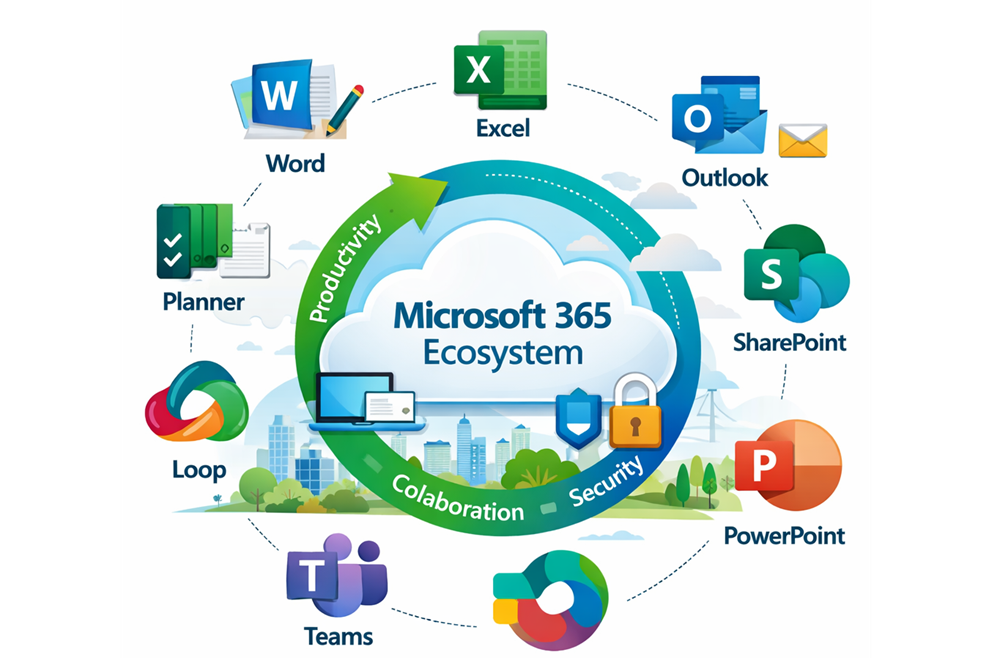
Microsoft 365 has firmly established itself as the backbone of modern enterprise communication and collaboration. From email in Exchange Online to file storage in OneDrive and SharePoint, and increasingly dynamic conversations in Teams, organizations are generating and storing vast amounts of data across a highly distributed ecosystem. Newer applications like Loop and Planner only add to this complexity. While this evolution has improved productivity, it has also created significant challenges for eDiscovery professionals tasked with identifying, collecting, and preserving relevant information.
Unlike traditional data sources, Microsoft 365 content is not centralized or easily exportable. Data is often fragmented across services, governed by layered permissions, and stored in formats that require context to fully understand. For legal and investigative teams, this means that what should be a straightforward collection process can quickly become time-consuming, resource-intensive, and dependent on IT or external vendors.
Organizations must collect data from:
- Exchange Online (email)
- OneDrive and SharePoint
- Teams chats and channels
- Emerging tools like Loop and Planner
This data is often fragmented, permission-restricted, and difficult to export efficiently.
CloudNine’s Approach: Direct, Unified Collection
CloudNine addresses these challenges by rethinking how Microsoft 365 data collection should work. Rather than relying on manual exports or disconnected tools, CloudNine leverages secure, API-driven integrations to enable direct access to Microsoft 365 data. This approach creates a unified collection experience across Exchange, OneDrive, SharePoint, Teams, and other emerging applications. By centralizing control within a single interface, legal teams can take ownership of the collection process without the traditional bottlenecks.
CloudNine simplifies Microsoft 365 collection through:
- Secure API-driven integrations
- Elimination of manual exports
- A unified interface across all data sources
Legal teams can now manage collections without heavy reliance on IT or third-party vendors.
Automation that Reduces Complexity
Automation plays a central role in this transformation. With CloudNine, collections can be initiated and managed based on custodians, allowing teams to target specific individuals and apply filters that narrow the scope of data from the outset. Once configured, collection jobs can be automatically created and executed, running in the background with minimal user intervention. This reduces the need for constant oversight while ensuring consistency and repeatability.
CloudNine introduces automation at every step:
- Custodian-based targeting and filtering
- Automated job creation and execution
- Background processing with minimal user intervention
CloudNine removes these inefficiencies with a direct pipeline from collection into CloudNine Review.
Automation does not come at the expense of data integrity or context. Complex data types, such as Teams conversations with embedded files or linked content, are collected in a way that preserves their relationships. This ensures that reviewers see communications as they originally occurred, rather than as disconnected fragments.
Another critical advantage of CloudNine’s approach is the elimination of costly and inefficient intermediary steps. Traditional workflows often involve multiple exports, staging environments, and reprocessing using separate tools. Each step introduces additional time, expense, and risk. By creating a direct pipeline from Microsoft 365 into CloudNine Review, these inefficiencies are removed entirely.
Seamless Transition into Review
This seamless transition from collection to review has a meaningful impact on case timelines. Legal teams can move more quickly into Early Case Assessment (ECA), gaining insights sooner and making informed decisions earlier in the process. At the same time, metadata integrity is preserved, and the risk of data loss or corruption is significantly reduced.
Defensibility and Compliance
From a defensibility standpoint, automation also strengthens compliance. Standardized workflows ensure that every collection follows the same repeatable process. Detailed logging and audit trails provide transparency into each action taken, supporting legal defensibility and alignment with EDRM best practices.
Ultimately, what has traditionally been one of the most challenging phases of eDiscovery is transformed into a streamlined, efficient, and reliable process. By combining direct integration with intelligent automation, CloudNine enables organizations to approach Microsoft 365 data collection not as a logistical hurdle, but as a strategic advantage.
The Result: A Transformed Collection Phase
What was once a bottleneck is now:
- Faster
- More defensible
- Cost-effective
CloudNine’s Microsoft 365 connectors give case teams a strategic advantage rather than a logistical challenge.
Other parts of this 4 part series: Part 1: Automated Redaction