Industry Trends

New Survey Shows eDiscovery Workload, Predictive Coding Use Increasing – eDiscovery Trends

eDiscovery workload, the use of predictive coding and projected rate of adoption of technically assisted review are all up significantly, according to a new report by recruiting and staffing firm The Cowen Group.

In its Executive Summary, the Q2 2014 Quarterly Critical Trends Report highlighted “three compelling and critical trends”, as follows:

  1. Workload and the rate of increase is up, significantly
  2. The demand for talent is still increasing, however at a much slower rate than last year.
  3. The use of predictive coding (PC) is up by 40 percent but the projected rate of adoption of technically assisted review (TAR) and PC is dramatically up by 75 percent.

The survey represents responses from one hundred eDiscovery partners and litigation support managers/directors from 85 Am Law 200 law firms.  Not all participants responded to all of the questions.  Some of the key findings from the survey are as follows:

  • 64 percent of respondents reported an increase in workload during the first half of 2014, up 12 percent from last year’s survey;
  • For those reporting an increase in workload, 88 percent replied that this growth was attributed to the higher number of cases they are managing, 77 percent attributed it to the larger size of each case and 65 percent attributed it to both factors;
  • 56 responding firms project that their workload will continue to increase over the next 6 months;
  • Despite the increase in workload and expected growth, over half of responding firms (50 out of 96) said the size of their eDiscovery departments has stayed the same, 26 responding firms reported an increase and 20 responding firms reported a decrease;
  • The majority of respondents (55 out of 97) also expect their eDiscovery department sizes to remain the same through the end of the year, with 41 out of the remaining 42 responding firms expecting an increase;
  • Based on responses, the strongest demand for talent over the past 6 months was in the positions of analysts and project managers;
  • As for TAR and predictive coding, 30 out of 78 responding firms reported that their use of TAR in review workflows increased over the last 6 months (46 out of the remaining 48 firms reported that it stayed the same), with a whopping 52 out of 78 responding firms reporting an expected increase over the rest of the year.

The FREE 8 page report has several additional survey results and is presented in an easy to read graphical format.  To review the report, click here.

So, what do you think?  Do any of those numbers and trends surprise you?  Please share any comments you might have or if you’d like to know more about a particular topic.

Disclaimer: The views represented herein are exclusively the views of the author, and do not necessarily represent the views held by CloudNine Discovery. eDiscoveryDaily is made available by CloudNine Discovery solely for educational purposes to provide general information about general eDiscovery principles and not to provide specific legal advice applicable to any particular circumstance. eDiscoveryDaily should not be used as a substitute for competent legal advice from a lawyer you have retained and who has agreed to represent you.

eDiscovery Throwback Thursdays – How Databases Were Used, Circa Early 1980s, Part 4

So far in this blog series, we’ve taken a look at the ‘litigation support culture’ in the late 1970’s and early 1980’s, and we’ve covered how a database was built.  We’re going to move on to discuss how those databases were used.  But first, if you missed the earlier posts in this series, they can be found here, here, here, here, here, here and here.

After coding and keying, data from magnetic tapes was loaded into a database, usually housed on a vendor’s timeshare computer.  This was before business people had computers on their desks, so litigation teams leased computer terminals – often called “dumb terminals”.  The picture above is of a Texas Instruments Silent 700 terminal – which was the standard for use by litigators.  This photo was taken at the Texas State Historical Museum.

These terminals were portable and came housed in a hard plastic case with a handle.  By today’s standards, they were not “compact”.  They were in fact quite heavy and not as easy to tote around as the laptops and tablets of today.  As you can see, there’s no screen.  You inserted a roll of thermal paper which ‘spit out’ search results.  And, as you can see, you accessed the mainframe using a standard telephone.  The phone’s handset was inserted into an acoustic coupler on the terminal, and you dialed the computer’s phone number for a connection.  You’re probably thinking that retrievals were pretty slow over phone lines…  yes and no.  Certainly response time wasn’t at the level that it typically is today, but the only thing being transmitted in search sessions was data.  There were no images.  So retrievals weren’t as slow as you might expect.

Searches were done using very ‘precise’ syntax.  You asked the database for information, and it collected precisely what you asked for.  There weren’t fuzzy searches, synonym searches, and so on.  The only real search that provided flexibility was stem searching.  You could, for example, search for “integrat*” and retrieve variations such as “integrate”, integrates”, “integrated” and “integration”.  The most commonly used search engines required that you start a search with a command (like “find”, “sort”, or “print”).  If you were doing a “find” command, that was followed by the field in which you wanted to search, an equal sign, and the word you were searching for.  To search for all documents authored by John Smith, your command might look like:

Find Auth=Smith-J*

The database responded by telling you how many records it found that matched your criteria.  Usually the next step was to sort the results (often by date or document number), and then print the results – that is, print the information that was coded for each record.  Keep in mind, “prints” were on a continuous roll of thermal paper spit out by the machine.  More often than not, searches were done by junior litigation team members and results were provided to a senior attorney to review.  So the thermal paper roll with the results was usually flattened and folded accordion-style to make reviews easier.

In next week’s post, we’ll discuss retrieval of the actual documents.

Please let us know if there are eDiscovery topics you’d like to see us cover in eDiscoveryDaily.

Disclaimer: The views represented herein are exclusively the views of the author, and do not necessarily represent the views held by CloudNine Discovery. eDiscoveryDaily is made available by CloudNine Discovery solely for educational purposes to provide general information about general eDiscovery principles and not to provide specific legal advice applicable to any particular circumstance. eDiscoveryDaily should not be used as a substitute for competent legal advice from a lawyer you have retained and who has agreed to represent you.

An Insufficient Password Will Leave You Exposed – eDiscovery Best Practices

In the first year of our blog (which now has over 1,000 posts!), we published a post regarding the importance of a strong password.  Given recent events with the Home Depot data breach and several celebrities’ accounts being hacked on Apple’s iCloud, it seems timely to revisit and update the topic.

As a cloud software provider, we at CloudNine Discovery place a premium on the security of our clients’ data.  For example, the servers hosting data for our OnDemand® platform are housed in a secured, SAS 70 Type II certified Tier 4 Data Center in Houston (which is where our headquarters is).  The security at this data center is military grade: 24 x 7 x 365 onsite security guards, video surveillance, biometric and card key security required just to get into the building.  Not to mention a building that features concrete bollards, steel lined walls, bulletproof glass, and barbed wire fencing.

Pretty secure, huh?  However, no matter how secure a system is, whether it’s local to your office or stored in the “cloud”, an insufficient password that can be easily guessed can allow hackers to get in and steal your data.  Some dos and don’ts:

Dos:

  • If you need to write passwords down, write them down without the corresponding user IDs and keep the passwords with important documents like your passport, social security card and other important documents you’re unlikely to lose.  Or, better yet, use a password management application that encrypts and stores all of your passwords.
  • Mnemonics make great passwords.  For example, “I work for CloudNine Discovery in Houston, Texas!” could become a password like “iw4C9diht!”. (by the way, that’s not a password for any of my accounts, so don’t even try)  😉
  • Change passwords every few months.  Some systems require this anyway.  You should also change passwords immediately if your laptop (or other device that might contain password info) is stolen.

Don’ts:

  • Don’t use the same password for multiple accounts, especially if they have sensitive data such as bank account or credit card information.
  • Don’t email passwords to yourself – if someone is able to hack into your email, then they have access to those accounts as well.
  • Personal information may be easy to remember, but it can also be easily guessed, so avoid using things like your kids’ names, birthday or other information that can be guessed by someone who knows you.
  • As much as possible, avoid logging into sensitive accounts when using public Wi-Fi as it is much easier for hackers to tap into what you’re doing in those environments.  Checking your bank balance while having a latte at Starbucks is not the best time.

The best and most difficult passwords to hack generally have the following components – many systems, including OnDemand (we require at least three of these) – require one or more of these:

  • Length: Good passwords are at least eight characters in length.  Longer passwords may be more difficult to enter, but you get used to entering them quickly,
  • Upper and Lower Case: Include at least one upper case and one lower case character.  For best results, don’t capitalize the first character (harder to guess),
  • Number: Include at least one number.  If you want to be clever, “1’ is a good substitute for “i”, “5” for “s”, “4” for “for”, etc.
  • Special Character: Also, include at least one special character, for best results, not at the beginning or end of the password.

When you follow the best practices above, your password should be much more difficult to hack, keeping you from feeling “exposed”.

So, what do you think?  How secure are your passwords?  Please share any comments you might have or if you’d like to know more about a particular topic.

Disclaimer: The views represented herein are exclusively the views of the author, and do not necessarily represent the views held by CloudNine Discovery. eDiscoveryDaily is made available by CloudNine Discovery solely for educational purposes to provide general information about general eDiscovery principles and not to provide specific legal advice applicable to any particular circumstance. eDiscoveryDaily should not be used as a substitute for competent legal advice from a lawyer you have retained and who has agreed to represent you.

eDiscovery Throwback Thursdays – How Databases Were Built, Circa Early 1980s, Part 3

In the last couple of Throwback Thursday posts we covered the first stages in a database-building project (circa 1980), including designing and planning a database, preparing for a project, establishing an archive, coding and qc, and production status record keeping. The next steps are described here.  But first, if you missed the earlier posts in this series, they can be found here, here, here, here, here and here.

Batching and Keying: After coding and quality control, the next step was batching the coding forms. An archive librarian removed completed coding forms from folders, ‘batched them into groups, updated the activity log, and packaged the forms for shipping.  The packaged forms were shipped off to a keypunch vendor – usually located outside of the U.S.  The vendor I worked for used a keying company located in Jamaica. The vendor keyed the information from the forms to magnetic computer tapes (see the image above). Those tapes and the coding forms were then shipped back to the coding vendor.  Depending on the size of the batch, keying could take days.  And there was shipping time on each end.  It could take a week or more to get data back for large batches.

Data Loading:  As I mentioned in an earlier post, for the most part, databases ‘lived’ on a vendor’s mainframe computer and were accessed by clients using computer terminals.  When the vendor received tapes from a keypunch vendor, the next step was loading to its mainframe computer.

End-User Training:  While this still happens today, training was a much bigger deal back in the day.  The normal business person was not computer literate – most of our clients had never used a computer before.  Training usually took a day or two, and it involved educating users on how to do searches, on how databases were structured, and on how data was coded in a specific database.

A word on schedules:  Today we live in a world where everything is done almost immediately.  Once documents are collected, processed and loaded (all of which can happen pretty quickly), documents are available for searching.  With initial databases, it usually took months before the first documents were available for searching.  Every step in the process (photocopying, archive establishment, coding, qc, batching, and keying ) took days or weeks.  Of course we didn’t wait for a step to be completed for all the documents before starting the next step, but even so, it was a long time before the first documents were available for searching.

A word on backups:  In the electronic world we live in today, we rely on computer backups…  and we do them frequently.  Even if there’s a significant technical problem, we can usually go to a fairly recent backup without too much work being lost.  This was always a concern with initial database projects.  Our law firm clients usually didn’t send us the ‘original working copy’ of a document collection.  They had a second copy made for the database work.  But a lot of work was done and a lot of time elapsed between delivery of those documents and data being available in the database.  Problems like fire, flooding, and packages lost in shipping could mean lost work.  And those things happened on occasion.

In next week’s post, we’ll take a look at how databases were used, and how searching and document retrieval worked.

Please let us know if there are eDiscovery topics you’d like to see us cover in eDiscoveryDaily.

Disclaimer: The views represented herein are exclusively the views of the author, and do not necessarily represent the views held by CloudNine Discovery. eDiscoveryDaily is made available by CloudNine Discovery solely for educational purposes to provide general information about general eDiscovery principles and not to provide specific legal advice applicable to any particular circumstance. eDiscoveryDaily should not be used as a substitute for competent legal advice from a lawyer you have retained and who has agreed to represent you.

Our 1,000th Post! – eDiscovery Milestones

When we launched nearly four years ago on September 20, 2010, our goal was to be a daily resource for eDiscovery news and analysis.  Now, after doing so each business day (except for one), I’m happy to announce that today is our 1,000th post on eDiscovery Daily!

We’ve covered the gamut in eDiscovery, from case law to industry trends to best practices.  Here are some of the categories that we’ve covered and the number of posts (to date) for each:

We’ve also covered every phase of the EDRM (177) life cycle, including:

Every post we have published is still available on the site for your reference, which has made eDiscovery Daily into quite a knowledgebase!  We’re quite proud of that.

Comparing our first three months of existence to now, we have seen traffic on our site grow an amazing 474%!  Our subscriber base has more than tripled in the last three years!  We want to take this time to thank you, our readers and subcribers, for making that happen.  Thanks for making the eDiscoveryDaily blog a regular resource for your eDiscovery news and analysis!  We really appreciate the support!

We also want to thank the blogs and publications that have linked to our posts and raised our public awareness, including Pinhawk, Ride the Lightning, Litigation Support Guru, Complex Discovery, Bryan University, The Electronic Discovery Reading Room, Litigation Support Today, Alltop, ABA Journal, Litigation Support Blog.com, InfoGovernance Engagement Area, EDD Blog Online, eDiscovery Journal, e-Discovery Team ® and any other publication that has picked up at least one of our posts for reference (sorry if I missed any!).  We really appreciate it!

I also want to extend a special thanks to Jane Gennarelli, who has provided some serial topics, ranging from project management to coordinating review teams to what litigation support and discovery used to be like back in the 80’s (to which some of us “old timers” can relate).  Her contributions are always well received and appreciated by the readers – and also especially by me, since I get a day off!

We always end each post with a request: “Please share any comments you might have or if you’d like to know more about a particular topic.”  And, we mean it.  We want to cover the topics you want to hear about, so please let us know.

Tomorrow, we’ll be back with a new, original post.  In the meantime, feel free to click on any of the links above and peruse some of our 999 previous posts.  Now is your chance to catch up!  😉

Disclaimer: The views represented herein are exclusively the views of the author, and do not necessarily represent the views held by CloudNine Discovery. eDiscoveryDaily is made available by CloudNine Discovery solely for educational purposes to provide general information about general eDiscovery principles and not to provide specific legal advice applicable to any particular circumstance. eDiscoveryDaily should not be used as a substitute for competent legal advice from a lawyer you have retained and who has agreed to represent you.

eDiscovery Blog Throwback Thursdays – How Databases Were Built, Circa Early 1980s, Part 2

The Throwback Thursday blog two weeks ago included discussion of the first stages in a database-building project (circa 1980), including designing and planning a database, and preparing for a project. The next steps are described here.  But first, if you missed the earlier posts in this series, they can be found here, here, here, here and here.

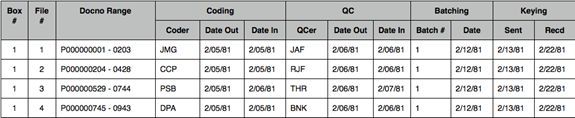
Establishing an Archive: Litigation teams shipped paper documents to be coded to a service provider, and the service provider’s first step was ‘logging documents in’ and establishing a project archive. Pages were numbered (if that hadn’t already been done) and put into sequentially numbered file folders, each bearing a label with the document number range.  Those files were placed into boxes, which were also sequentially numbered, each of which had a big label on the front with the range of inclusive files, and the range of inclusive document numbers.

Logs were created that were used to track a folder’s progress through the project (those logs also meant we could locate any document at any time, because the log told us where the document was at any point in time).  Here are sample log entries for a few folders of documents:

Note, this sample is a little misleading:  logs were filled in by hand, by an archive librarian.

Coding and QC: Folders of documents were distributed to ‘coders’ who recorded information for each document – using a pencil and paper coding form that had pre-printed field names and spaces for recording information by hand.  When a coder finished coding all the documents in a folder, the coding forms were put in the front of the folder, the folder was turned back into the archive, and the next folder was checked out.  The same process was used for qc (quality control) – the documents and coding forms were reviewed by a second person to ensure that the coding was correct and that nothing was missed.

As project managers, we kept very detailed records on progress so that we could monitor where things stood with regard to schedule and budget.  At the end of every workday, each coder and qcer recorded the number of hours worked that day and the number of documents and pages completed in that day.  An archive librarian compiled these statistics for the entire coding and qc staff, and on a daily basis we calculated the group’s coding and qc rates and looked at documents / pages completed and remaining so that we could make adjustments if we were getting off schedule.

In next week’s post, we’ll look at the next steps in a database-building project.

Please let us know if there are eDiscovery topics you’d like to see us cover in eDiscoveryDaily.

Disclaimer: The views represented herein are exclusively the views of the author, and do not necessarily represent the views held by CloudNine Discovery. eDiscoveryDaily is made available by CloudNine Discovery solely for educational purposes to provide general information about general eDiscovery principles and not to provide specific legal advice applicable to any particular circumstance. eDiscoveryDaily should not be used as a substitute for competent legal advice from a lawyer you have retained and who has agreed to represent you.

Thursday’s ILTA Sessions – eDiscovery Trends

As noted Monday, Tuesday and yesterday, the International Legal Technology Association (ILTA) annual educational conference of 2014 is happening this week and eDiscoveryDaily will be reporting this week about the latest eDiscovery trends being discussed at the show.  This is the last day to check out the show if you’re in the Nashville area with a number of sessions still available and over 190(!) exhibitors providing information on their products and services.

Perform a “find” on today’s ILTA conference schedule for “discovery” or “information governance” and you’ll get 3 sessions with hits.  So, there is plenty to talk about!  Sessions in the main conference tracks include:  So, there is plenty to talk about!  Sessions in the main conference tracks include:

11:00 AM – 12:30 PM:

LEDES – The Proliferation of Jurisdictional e-Billing Requirements and UTBMS Code Sets

Description: The ABA originally released four UTBMS (Uniform Task Based Management System) code sets in 1998. The original code sets were tailored to categorize services performed by counsel on litigation and bankruptcy matters, or to accommodate project and counseling work. The past few years have been marked by a dramatic increase in the number of UTBMS code sets available, with the development of additional (or revision of existing) code sets for jurisdictional billing (Canada, England and Wales) and for Governance, Risk and Compliance, Knowledge Management, Patent, Trademark, transactional and eDiscovery work. What’s going on with all this new development? How do jurisdictional laws and requirements impact the complexity of implementing UTBMS in law firms? What steps is the LOC considering to alleviate this burden? During this session we will take a look at the various jurisdictions worldwide requiring eBilling and how jurisdictional billing codes are proliferating as a result. Audience participation is encouraged!

Speakers are: Jane A. Bennitt – Global Legal Ebilling, LLC; Cathi J. Collins – Bridgeway Software.

Large Firm Hustle: An Oscar-Worthy Discussion Forum

Description: Large firms have unique pain points (and unique successes) worthy of a closer look. Join our thought-provoking discussion as we focus on issues — such as IT department relocation, DMS security and collaboration, information governance, email headaches and client-driven changes in legal IT — that profoundly affect larger legal organizations.

Speakers are: John Kuttler – Finnegan, Henderson, Farabow, Garrett & Dunner, LLP; Constance Hoffman – Bryan Cave, LLP.

3:30 PM – 4:30 PM:

E-Discovery Review Platform Selection – One Year Later

Description: Attend this follow up to last year’s popular panel discussion which focused on the search for and selection of e-discovery solutions. We have reconvened a panel to discuss the solutions they selected and will now share lessons learned from the complicated steps of implementation, rollout and adoption. The panel will also offer guidance and advice for all those contemplating or in the middle of the selection and deployment of an e-discovery solution.

Speakers are: Stephen Dooley – Sullivan & Cromwell LLP; Deanna E. Blomquist – Faegre Baker Daniels LLP; David Hasman – Bricker & Eckler LLP.

For a complete listing of all sessions at the conference today, click here.

So, what do you think?  Are you planning to attend ILTA this year?  Please share any comments you might have or if you’d like to know more about a particular topic.

Disclaimer: The views represented herein are exclusively the views of the author, and do not necessarily represent the views held by CloudNine Discovery. eDiscoveryDaily is made available by CloudNine Discovery solely for educational purposes to provide general information about general eDiscovery principles and not to provide specific legal advice applicable to any particular circumstance. eDiscoveryDaily should not be used as a substitute for competent legal advice from a lawyer you have retained and who has agreed to represent you.

Wednesday’s ILTA Sessions – eDiscovery Trends

As noted Monday and yesterday, the International Legal Technology Association (ILTA) annual educational conference of 2014 is happening this week and eDiscoveryDaily will be reporting this week about the latest eDiscovery trends being discussed at the show.  There’s still time to check out the show if you’re in the Nashville area with a number of sessions available and over 190(!) exhibitors providing information on their products and services.

Perform a “find” on today’s ILTA conference schedule for “discovery” or “information governance” and you’ll get 4 sessions with hits.  So, there is plenty to talk about!  Sessions in the main conference tracks include:  So, there is plenty to talk about!  Sessions in the main conference tracks include:

11:00 AM – 12:30 PM:

Aligning the Tenets of Information Governance with Your Firm’s IG Strategy

Description: Learn to develop an information governance strategy that incorporates the four dimensions of information risk management (records management, privacy, cybersecurity and e-discovery.) Our panel will share examples of how they integrated setting controls, reduced costs and improved compliance at their firms.

Speakers are: James Fortmuller – Kelley Drye & Warren LLP; Ann Ostrander – Kirkland & Ellis LLP; Brynmor Bowen – Greenheart Consulting Partners LLC; Terry Coan – HBR Consulting LLC.

What Happens on Facebook Doesn’t Stay on Facebook: Social Media Discovery Tools

Description: Social media are a rich, enormous source of information. We’ll take a look at both the legalities of using social media e-discovery and pros and cons of different tools, such as products for Facebook, Twitter, MySpace, LinkedIn, Website Archival and web-based email.

Speakers are: Julie K. Brown – Vorys, Sater, Seymour and Pease LLP; Doug Matthews – Vorys, Sater, Seymour and Pease LLP; Andrew Keck – ProFile Discovery.

1:30 PM – 2:30 PM:

A Checklist for Getting the Most Out of Your E-Discovery Vendor Relationship

Description: Today’s legal environment has made it nearly impossible to have litigation without some amount of e-discovery involving an outside vendor. E-discovery can be fully outsourced, done entirely in-house or involve a combination of both. Whatever your organization’s e-discovery needs, it’s important to know how to navigate the vendor relationship. Leave with a checklist of issues to consider and important questions to ask when evaluating e-discovery vendor services.

Speakers are: Kristen Atteberry – Faegre Baker Daniels LLP; Brett Tarr – Caesars Entertainment Legal Department; Babs Deacon – The EDJ Group Inc.

3:30 PM – 4:30 PM:

Anything You Can Do I Can Do Better … Predictive Coding vs. Human Review

Description: As Ethel Merman and Ray Middleton melodically contested in “Annie Get Your Gun”, “Anything you can do, I can do better; I can do anything better than you”. The disagreement continues when comparing predictive coding to human review. Come hear results of the Electronic Discovery Institute’s predictive coding study and get a non-biased, scientific view into the world of predictive coding. How did e-discovery service providers compare to each other? Do quality results and high cost go together? How did human review results compare to predictive coding? Do humans still rule?

Speaker is: Patrick L. Oot – Shook, Hardy & Bacon L.L.P.

For a complete listing of all sessions at the conference today, click here.

So, what do you think?  Are you planning to attend ILTA this year?  Please share any comments you might have or if you’d like to know more about a particular topic.

Disclaimer: The views represented herein are exclusively the views of the author, and do not necessarily represent the views held by CloudNine Discovery. eDiscoveryDaily is made available by CloudNine Discovery solely for educational purposes to provide general information about general eDiscovery principles and not to provide specific legal advice applicable to any particular circumstance. eDiscoveryDaily should not be used as a substitute for competent legal advice from a lawyer you have retained and who has agreed to represent you.

Tuesday’s ILTA Sessions – eDiscovery Trends

As noted yesterday, the International Legal Technology Association (ILTA) annual educational conference of 2014 is happening this week and eDiscoveryDaily will be reporting this week about the latest eDiscovery trends being discussed at the show.  There’s still time to check out the show if you’re in the Nashville area with a number of sessions available and over 190(!) exhibitors providing information on their products and services.

Perform a “find” on today’s ILTA conference schedule for “discovery” or “information governance” and you’ll get 3 sessions with hits.  So, there is plenty to talk about!  Sessions in the main conference tracks include:  So, there is plenty to talk about!  Sessions in the main conference tracks include:

11:00 AM – 12:30 PM:

ARMA: Information Governance: A Revenue Source Potential

Description: Law firms are under increased financial pressure due to a highly competitive market and clients demanding fixed-fee contracts. Information governance (IG) offers firms the opportunity to not only create a new practice but also to tap into a new source of revenue by leveraging existing relationships and experience. Attendees will learn about the impact of IG, opportunities for information governance at law firms and how law firms can help their clients with IG.

Speaker is: Martin Tuip – ARMA International

1:30 PM – 2:30 PM:

Ungoverned Information Equals Litigation Disaster: What Your Firm Should Do

Description: What’s the difference between well-controlled risk and unmitigated disaster? Information governance (IG) of course! Because client data often enters your firm through the litigation support process, effective risk management relies on successful collaboration between IG, litigation support and IT. Our experienced panel will share guidance on how to build successful, practical IG processes around e-discovery. We’ll focus on real-world consequences of IG failure in this realm and tactics firms are using to mitigate associated risks.

Speakers are: Caroline Sweeney – Dorsey & Whitney; Teresa Britton – Exelon Corporation Business Services Company; Brian Jenson – Orrick, Herrington & Sutcliffe LLP.

3:30 PM – 4:30 PM:

Tell It to the Judge – An Audience with Respected Jurist Judge Andrew Peck on Various E-Discovery Topics

Description: Judge Peck will look into his crystal ball to dicuss five prevalent e-discovery topics and answer additional questions from the audience. Come hear the views of an esteemed judge regarding these topics.

Speakers are: Thomas Morrissey – Purdue Pharma L.P.; Andrew J Peck – US District Court Southern District of New York.

For a complete listing of all sessions at the conference today, click here.  There’s even yoga!

So, what do you think?  Are you planning to attend ILTA this year?  Please share any comments you might have or if you’d like to know more about a particular topic.

Disclaimer: The views represented herein are exclusively the views of the author, and do not necessarily represent the views held by CloudNine Discovery. eDiscoveryDaily is made available by CloudNine Discovery solely for educational purposes to provide general information about general eDiscovery principles and not to provide specific legal advice applicable to any particular circumstance. eDiscoveryDaily should not be used as a substitute for competent legal advice from a lawyer you have retained and who has agreed to represent you.

eDiscovery Trends: Welcome to ILTA 2014!

The International Legal Technology Association (ILTA) annual educational conference of 2014 kicked off yesterday with several networking events, and begins in earnest today with the first day of sessions.  eDiscoveryDaily will be reporting this week about the latest eDiscovery trends being discussed at the show.  Over the next four days, we will provide a description each day of some of the sessions related to eDiscovery to give you a sense of the topics being covered.

If you’re in the Nashville area, come check out the show – there are a number of sessions available and over 190(!) exhibitors providing information on their products and services.  Perform a “find” on today’s ILTA conference schedule for “discovery” or “information governance” and you’ll get 8 sessions with hits.  So, there is plenty to talk about!  Sessions in the main conference tracks include:

10:45 AM – 12:00 PM:

Law Department Operations Roundtable (Law Department Day)

Description: Law departments experience myriad issues unrelated to e-discovery. Let’s get ’em out on the table! We’ll discuss topics that interest attendees and hear from those who have tackled these issues.

Speaker is: Thomas Morrissey – Purdue Pharma L.P.

11:00 AM – 12:00 PM:

A Need for Speed: Leveraging Analytics in Document Review

Description: Dwindling are the days of straight linear reviews as the volume and complexity of data involved in e-discovery make it nearly impossible to deliver timely, error-free services. Our experienced panelists will describe and demonstrate how they have leveraged various strategies and advanced analytics to achieve accurate, timely and defensible results.

Speakers are: Greg R. Chan – Bingham McCutchen LLP; Michael Quartararo – Stroock & Stroock & Lavan LLP; Joy Holley – Bryan Cave, LLP.

12:00 PM – 1:30 PM:

Diving Deep Into E-Discovery: Law Department Roundtable (Law Department Day)

Description: For many law departments, significant portions of the budget and resources are allocated to e-discovery. Participate in this roundtable as we discuss e-discovery challenges in the short- to mid-term, e-discovery best practices, collaboration with vendors and law firms, and identification of high-performing providers and e-discovery tools and systems.

Speakers are: Eric Lieber – Toyota Motor Sales; Julie M Richer – American Electric Power Legal Department.

1:00 PM – 2:00 PM:

What Makes Up ESI Protocols? (Part I)

Description: A “Meet and Confer” in three acts! This panel will offer drama, intrigue and a good time for all. Watch two parties prepare for and then engage in a Meet and Confer session involving common e-discovery issues. Go behind the scenes as each party strategizes and formulates their “position,” then observe as they work to put themselves and their clients in the best position possible. Remaining disputes will be argued in front of the “court.”

Speakers are: Patrick L. Oot – Shook, Hardy & Bacon L.L.P.; Bryon Bratcher – Reed Smith LLP; Andrew J Peck – US District Court Southern District of New York; Steven L. Clark – Lathrop & Gage LLP; Candi Smith – Winston & Strawn LLP; Joy Holley – Bryan Cave, LLP; Craig Ball – Craig D. Ball, P.C.; Dera Jardine Nevin – Re:Discovery Law PC.

Build Enterprise Information Governance from the Ground Up

Description: Enterprise information governance programs are often as complex as the problems they intend to solve, incorporating governance needs, requirements from various internal and external stakeholders, and tight budgets. Here we’ll walk through best practices any organization can use to kick-start an IG program and make quick progress. We’ll discuss topics like assessing the current situation and capabilities, prioritizing risks and opportunities, gaining support from all stakeholders for an IG framework, and simple ways to start.

Speakers are: Rudy Moliere – Morgan, Lewis & Bockius, L.L.P.; Eric Mosca – InOutsource; Dana C. Moore – Vedder Price P.C.; Bennett Borden – Drinker Biddle & Reath LLP.

2:30 PM – 3:30 PM:

Predictive Analytics: Email Management Magic?

Description: Email management — managing mailbox size, archiving and retention — remains at the top of the list of email challenges identified by firms in the ILTA Technology Survey. A diverse panel of vendor and information governance experts will focus on specific predictive analytics applications and technologies that are available that could tackle email management. How do the solutions work, and what might they require from technical, cost and risk standpoints? Can predictive analytics perform email management magic?

Speakers are: Neil Etheridge – Recommind, Inc.; Avi Elkoni – Equivio; Jason R Baron – Drinker Biddle & Reath LLP; Sandra Serkes – Valora Technologies, Inc.; Mark Olson – Data Skill, Inc.

3:15 PM – 4:15 PM:

Services and Applications: Jump-Start the Vetting Process (Law Department Day)

Description: Join your law department peers for an interactive discussion about matter management, e-discovery and legal holds. In the unique format of “mini-panels,” participants will engage in discussions on each topic in three 15-minute breakout sessions. This will allow for more intimate group discussions. The types of questions and topics to be vetted in each mini-panel include various software solutions and how your organization utilizes them, processes and procedures, what is working best for you and key criteria for selecting the right fit for your company.

Speakers are: Glenn O’Brien – Massachusetts Mutual Life Insurance Company; Amie Dutey – Nationwide Mutual Insurance; Anthea Cooper – Nationwide Mutual Insurance; Donald Knight – PNC Bank Legal Department; Martin Susec – Nationwide Mutual Insurance.

4:00 PM – 5:00 PM:

What Makes Up ESI Protocols? (Part II)

Description: This is part two of our “Meet and Confer” in three acts! This panel will offer drama, intrigue and a good time for all. Watch two parties prepare for and then engage in a Meet and Confer session involving common e-discovery issues. Go behind the scenes as each party strategizes and formulates their “position,” then observe as they work to put themselves and their clients in the best position possible. Remaining disputes will be argued in front of the “court.”

Speakers are: Patrick L. Oot – Shook, Hardy & Bacon L.L.P.; Bryon Bratcher – Reed Smith LLP; Andrew J Peck – US District Court Southern District of New York; Steven L. Clark – Lathrop & Gage LLP; Candi Smith – Winston & Strawn LLP; Joy Holley – Bryan Cave, LLP; Craig Ball – Craig D. Ball, P.C.; Dera Jardine Nevin – Re:Discovery Law PC.

For a complete listing of all sessions at the conference, click here.

So, what do you think?  Are you planning to attend ILTA this year?  Please share any comments you might have or if you’d like to know more about a particular topic.

Disclaimer: The views represented herein are exclusively the views of the author, and do not necessarily represent the views held by CloudNine Discovery. eDiscoveryDaily is made available by CloudNine Discovery solely for educational purposes to provide general information about general eDiscovery principles and not to provide specific legal advice applicable to any particular circumstance. eDiscoveryDaily should not be used as a substitute for competent legal advice from a lawyer you have retained and who has agreed to represent you.